en


Your deposit lands in one place, but three of our products keep their own balance. Before you spin a 918KISS reel or sit down at a KaiYuan table, the money has to be moved across, and it has to be moved back before you request a withdrawal. This page walks through the Transfer screen, the bonus wallet, and the reason a balance can look as if it has vanished.
The Main Account is the centre of everything. Deposits arrive there, and it is the balance a withdrawal is requested against. Each 88GASIA wallet beyond that one holds its own money, so a credit inside a game wallet is only available to that game until you send it home.
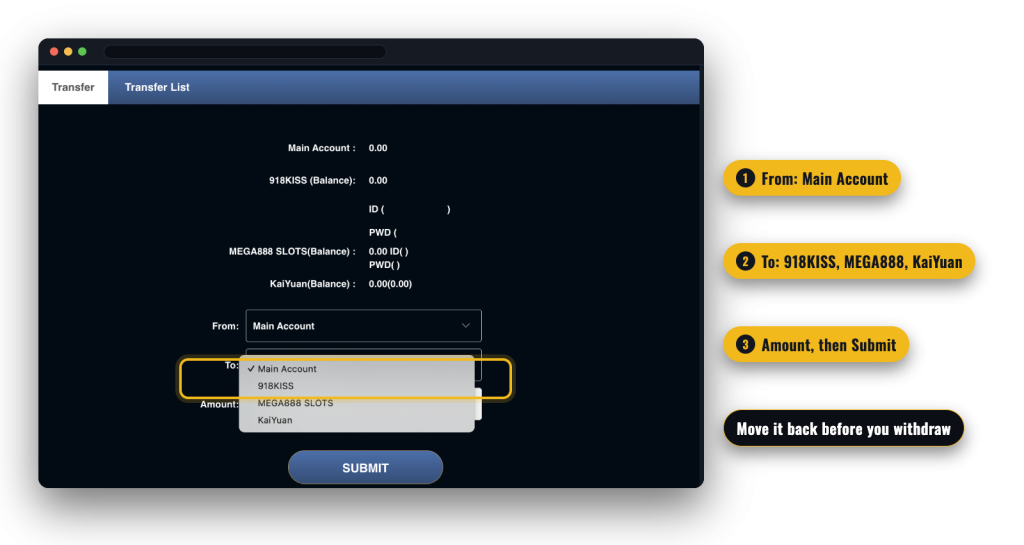
Three products appear as separate wallets on the Transfer screen: 918KISS, MEGA888 SLOTS and KaiYuan. The first two are the standalone slot apps, and KaiYuan is the poker product. The other areas of the site, including the sportsbook, live casino and slot sections of the lobby, are not listed as separate wallets in Transfer.
| Wallet | What it is for | What the Transfer screen shows |
|---|---|---|
| Main Account | Holds deposits; the balance a withdrawal is requested against | Your available balance, selectable as the From or To side of a transfer |
| 918KISS | Play inside the 918KISS app | The wallet balance plus the game ID and password used to log in to the app |
| MEGA888 SLOTS | Play inside the Mega888 app | The wallet balance plus the ID and password fields for that app |
| KaiYuan | Poker and card games | The wallet balance for the poker product |
Two balances also sit side by side in the header: Balance (MYR), which is your Main Account, and Bonus. They are counted separately, which matters later.
Transfers are manual in both directions, so build the habit into your session: move in what you intend to play with, and move the rest back when you stop. If you plan to cash out the same evening, do the return transfer first, then look at your Main Account figure before filling in the withdrawal form. Our published processing target for a local bank transfer is under 15 minutes once the request is verified, and the full withdrawal limits and timing are set out with the other payment rules.
One more field belongs to the deposit stage rather than the transfer stage. The deposit form has a required Promotion selector, and that is the moment a deposit either carries a bonus or does not, which changes what has to be wagered before anything can leave the account.
Everything above happens inside the member area, so log in, move your credit to the game you want and play from the right wallet.
Those two apps do not use the username you log in here with. Each has its own game ID and password, displayed beside the matching wallet on the Transfer screen, and you enter them in the app itself. Treat them like any other credential: keep them to yourself and never pass them to anyone who asks, including someone claiming to be support. The full setup and download walkthrough sits on our 918KISS and Mega888 guide.
Poker runs on KaiYuan, and it takes the same route as the slot apps: pick KaiYuan in the To field, transfer what you want at the table, and move the remainder back afterwards. Keep in mind that poker turnover is excluded from most of our promotions, so a KaiYuan session is not the one to use when you are working through a deposit bonus.
The Bonus figure in the header is the second balance in your account, and it fills up from promotions rather than from deposits. Weekly rebates are credited there, as is the birthday bonus once the ID check clears. Because it is counted separately from your Main Account, a rebate arriving on Monday will not change the number you were watching in the main balance.
The Bonus area of the member area is where the record lives. It carries a Bonus Type field, for example Transfer Bonus, with an Amount, and the tabs Referral List, Update Bonus, Apply for bonus list, Promotion list and Auto Promotion. Further tabs in the same member menu include Achievement and Message Box, the latter holding dated messages sent to your account.
Nothing disappears, but the wallet model produces a few moments of panic. Here is what each one means in practice.
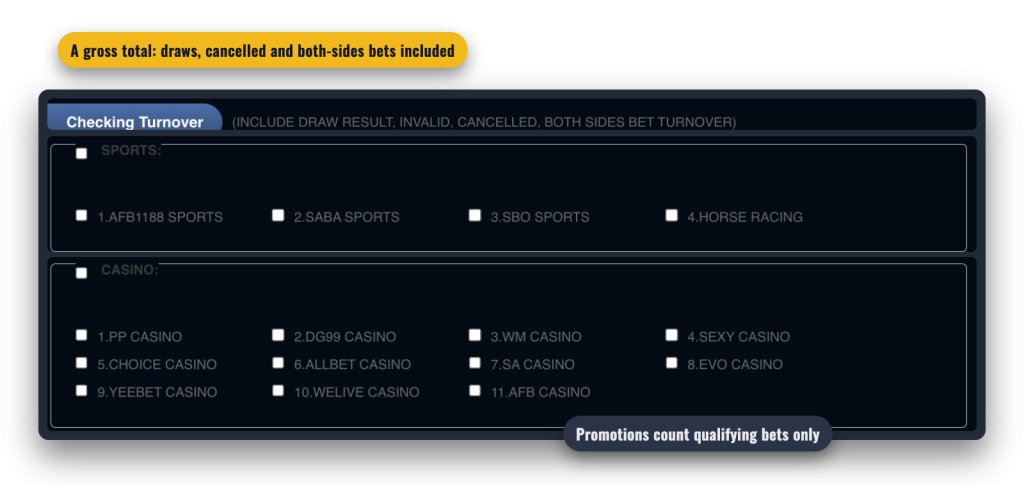
Turnover Checking is the tool for reconciling what you wagered. Pick a date range, then tick the products you want counted. They are grouped: Sports covers AFB1188 Sports, SABA Sports, SBO Sports and Horse Racing; Casino lists the eleven live studios; Slots lists the full set of providers; Lottery covers Khmer Gaming and Khmer Gaming 2; and Poker stands on its own.
The figure it returns is a gross total. It includes draw results, invalid, cancelled and both-sides bets, and our promotions and rebates exclude exactly those. So the checker can show more turnover than a bonus requirement or a rebate ever counts, and that gap is normal rather than an error.
A quick example on the 1% sportsbook rebate. Say the checker reports RM10,000 of sports turnover for the week, but RM1,000 of it was draws, cancelled bets and 1X2 selections. The rebate is worked out on the remaining RM9,000, so it pays RM90 rather than the RM100 the screen seems to promise. The same logic applies to a wagering requirement: only qualifying bets move you toward it.
When the gap between the two numbers matters, go one level down. Bet Reports and Statements both filter by product and by period, using Today, Yesterday, This week, Last week, This month and Last month, and they list the individual bets behind the total. That is the quickest way to see which entries the checker counted and a promotion would not.
Wallets are the plumbing behind everything else on the site. For the sportsbooks, live studios, rebates and how to get started, see the platform overview.